css
Map
Realistic_ALL_Weapon_spawners
robotics
20 Jan 2026
Realistic
3D Preview
Controls: WASD to move, Mouse to look. Depending on map size, loading may take time.
Description
Made by Toshiro
Steam Id: Shinoteseu
Email: Bardockacs@hotmail.com
///////////INSTALL\\\\\\\\\\\\\\\\\
Take the bsp and put it in your cstrike maps folder
C: -> Program files -> Steam -> Username -> Counterstrike source -> Cstrike -> Maps
You can load the VMF from anywhere on your computer from hammer.
The texutures "Folder" must be put in
C: -> Program files -> Steam -> Username -> Counterstrike source -> Cstrike -> Materials
You will then be able to find them in hammer and apply them to the box's.
///////////////DESCRIPTION\\\\\\\\\\\\\\\
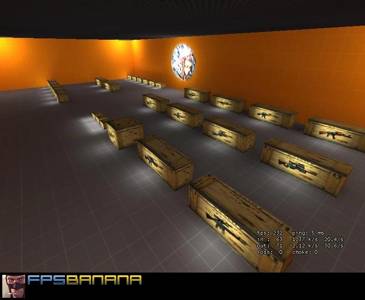
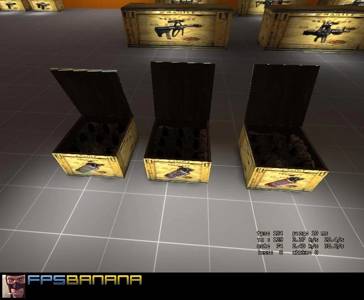
This Prefab comes with 27 unqiue Weapon spawners with their own individual weapon textures to identify which box holds which weapons. The Box's are sized according to their class be it pistol, shotgun, smg, rifle, machine gun, or item.
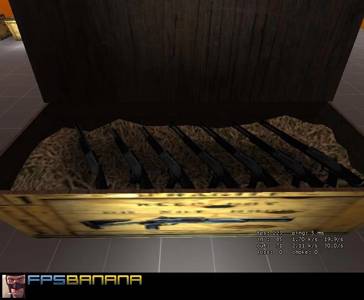
The spawners are designed so that weapons cannot be taken from them when the lid is closed giving a realistic feeling weapon box.
/////////////////////USAGE\\\\\\\\\\\\\\\\\\\\\\\\\\
Part one:
--------------
Armory mode and spawner mode.
These weapon spawners can be used to replenish their supplys per opening or used as armourys by making it so the lid never closes.
In hammer set the "Delay before reset" in the properties of the lid of your box to -1 so that the lid only opens once and never closes.
Alternatively go into the outputs tab in the lids properties and delete the
output "Onfullyclosed", "Weaponname", "Kill"
and in the output
"Onopen", "T_Weaponame", "Forcespawn" to only fire once.
The alternative measure will cause an unrealistic effect when the box closes though because weapons can be grabbed from inside the box while its closes, to prevent this effect its wise to also set the delay before reset to -1, and in the flags tab check the toggle box so that the lid can still be closed if need be, however weapons can still be granned from inside.
-------------------
Part two:
---------
Resizing the boxs.
The boxes can be resized by simply editing the dimensions of the sides to whatever size you want longways sideways and upwards. Then select the displacement inside the box (The hay) And stretch that to fit the box. You will need to do the same with the lid of the box.
To reshape the hay if it looks weird, go to the face edit tool (it has a blue red and green face on it in the tool bar).
-Click the top of the hay
-Go to the Displacements tab
-Click paint geometry
-Use mouse1 to rise the hay and mouse2 to lower it)
----------------------
Part three:
-------
Adding additional weapons.
After resizing a box it might be a good idea to add more weapons to it, to do so just simply select a weapon already in the box and hold shift while dragging it, when you release mouse1 it will clone that weapon which will already have all the material needed to spawn when the lid opens.
----------------------
Part four:
---------
Party boxs
It is possible to make different weapons all spawn from the same box, for instance if you wanted to make a box spawn an AK, 2 flash bangs, a He, a Smoke, and a Deagle then you could do so by simply placeing all the items in the box.
Then Go into properties of each weapon and make sure they are all named the same thing.
EG: AKpartybox
Then in the Point_template sitting above the box go into its properties and select template 1 and enter the name AKpartybox
The point_template should already be named and working when the lid opens, but if you wish to rename it then you must also select the lid and edit the outputs.
For instance the output
"Onopen", "T_deagle", "Forcespawn" should be changed to something like "Onopen", "T_AKpartbox", "Forcespawn"
No matter what the output
"Onfullyclosed", "Weapon", "Kill" has to be changed to
"Onfullyclosed", "AKpartybox, "kill".
This way weapons can't be grabbed when the lid closes, and when the lid reopens it won't spawn weapons inside weapons.
-------------
Part five:
-----
Retexturing the resized boxes
The best way to do this is use the face edit tool and just click fit on the four sides and the top. There are 4 extra faces which are part of two side pieces. If you want to make these fit in then you need to select the middle side face and click fit, then apply, then use the x and y axis toggle bars to move it to a good postion, then use mouse2 on the faces next to it to make it seem like one face.
-------------
Part six:
------------
Editing Secondary Ammunation.
In properties of a weapon go to smart edit and click add value.
Name the value Ammo and for the value put the amount of ammo you want.
EG:
Weapon_m249
Ammo 800
---------------
CREDITS:
These Weapon spawners were inspired by tophatwaffles works including the hay effect used in BA_jail_xtreme_uprise, and his Grenade box.
You can veiw more of his works at http://www.tophattwaffle.com/
ADDITIONAL NOTES:
The original TGA files for the texutures have been added if improvements wish to be made.
Original source: https://gamebanana.com/mods/3030
Note: This map was automatically uploaded by a bot.
spawners
File Details
Filename
Prefab_Weaponspawners.bsp
MD5 Hash
c2c5ecb060...
Path
/css/map/...
Comments (0)
Login to comment.